Panda
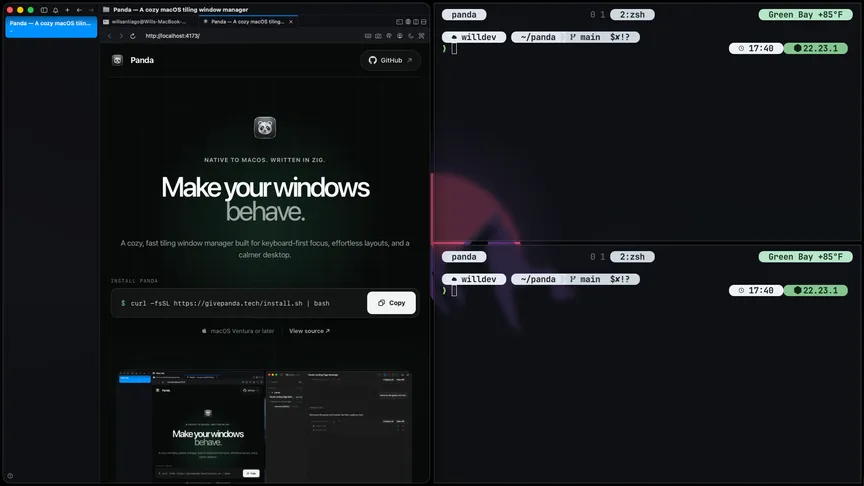
A keyboard-driven macOS tiling window manager written in Zig. A background daemon owns window state while a small CLI sends commands over a per-user socket.
- Status
- Released
- Technologies
- Zig / Objective-C / macOS Accessibility APIs
The problem
A keyboard-driven workspace needs a predictable way to place windows, move focus, and return to a group of applications. Panda builds those operations on top of ordinary macOS windows. It supports binary space partitioning, a grid, and a master-stack layout.
Daemon and command line
The Zig daemon keeps track of windows and applies layouts through macOS Accessibility APIs. The CLI sends requests over a local Unix socket owned by the current user. An Objective-C bridge exposes native macOS functionality to Zig. Separating command transport from window tracking gives the CLI, hotkeys, and app bundle a common set of operations.
For example, these commands operate on the current desktop:
panda focus leftpanda swap rightpanda desktop 2Workspace state
Panda manages virtual workspaces independently of Mission Control. As windows open, close, or move between displays, the manager must keep its own workspace state in sync with what macOS reports. Multi-monitor layouts use the display that contains the focused window. The app bundle also has a settings editor that preserves comments and unknown fields in the shared configuration and leaves dynamic Lua untouched when it cannot safely edit it.
Release
Panda ships as an app bundle and a CLI archive for Apple Silicon on macOS Ventura or later. Window control requires permission in macOS Accessibility settings. The public release and source provide the distribution and implementation details.